PaintAGame
Beginner guide

How to Play Paint a Game

A safe first-session route through the official plot, icon-search, canvas, painting, multiplayer, and autosave loop.

Checked July 21, 2026Universe 10440766252
Quick answer

Start here

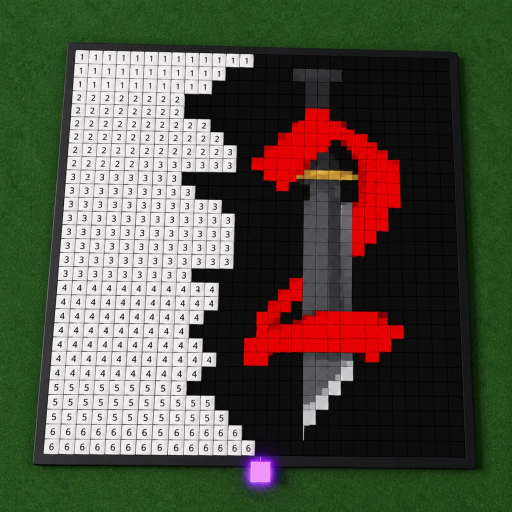
Join the Paint a Game experience by dilly dally games, claim an available plot, search for a Roblox experience whose icon you want to recreate, load that icon onto the canvas, then match the numbered or colored cells block by block. The official listing says your progress saves automatically.

Step-by-step

Follow the painting flow

The steps stay within the official description and the selected game identity. Button names can change, so use the matching in-game prompt rather than expecting a fixed label.

  1. 1

    Confirm the correct experience

    Open the Roblox experience linked from this site and check that the creator is dilly dally games. Same-title Roblox and PC results exist, so creator and universe identity matter before following any guide.

  2. 2

    Claim a plot

    Enter the experience and use the visible prompt for an available painting plot. The exact button label may change; this guide does not guess a keyboard, touch, or controller mapping.

  3. 3

    Choose an icon reference

    Use the game search described by the creator to find a Roblox experience you recognize. Pick a subject you can comfortably read cell by cell; no official catalog size or difficulty ranking is published.

  4. 4

    Paint the canvas in sections

    Work through a small visual region at a time and compare it with the loaded icon. The official art shows a numbered grid, but this guide does not assume every canvas or interface uses identical labels.

  5. 5

    Pause with a clear checkpoint

    Before leaving, note your completed region or enter your own cell counts in the progress planner. Autosave is advertised, but the timing and recovery behavior are not documented.

If you're stuck

Common mistakes and safer checks

Following the wrong same-title game

Check for dilly dally games and Universe 10440766252. Version 0.5.3 material belongs to a different Roblox universe.

Expecting fixed control labels

Use the prompts displayed on your device. We have not verified platform-specific keys or controller buttons.

Assuming a save happened instantly

The listing promises automatic saving but gives no interval. Avoid claiming a recovery guarantee if a recent section is missing.

Known limits

What this guide does not claim

  • No official canvas dimensions or icon catalog size are claimed.
  • No rewards, scores, currencies, levels, or completion bonuses were selected from official sources.
  • No exact platform control mapping is published.
  • The four-player description and six-player API maximum are both disclosed rather than forced into one answer.

PaintAGame is an independent fan guide, not Roblox or dilly dally games. Use the official experience for current UI and support.

FAQ

Questions players ask

What do you do in Paint a Game?

The official listing says you claim a plot, search for a Roblox game, load its icon onto your canvas, and recreate it block by block.

Does Paint a Game save progress?

The official description says painting progress saves automatically. It does not publish a save interval or recovery guarantee.

Can I play Paint a Game with friends?

The listing describes multiplayer painting. Its text says four-player while the Roblox API snapshot reported a maximum of six, so treat current capacity as an in-game check.

Is this guide for the correct Paint a Game?

Yes. It covers Universe 10440766252, root place 112486562974119, by dilly dally games—not the same-title experience by Let's Make More.

Next steps

Keep painting with the right reference